
Magnification Explained
Comments Off on Magnification Explained
Understanding Magnification: What Is a Diopter and How Do I Choose the Right Lens?
If you’ve ever shopped for an illuminated magnifier and felt confused by terms like “diopter,” “focal length,” and “working distance” — you’re not alone. This guide breaks it all down in plain language so you can choose the right magnifier for your work.
What Is a Diopter?
A diopter is an optical measurement that describes how strongly a lens bends light — technically called its refractive capacity. In practical terms, it tells you how much a lens magnifies.
Here’s the key rule to remember: every diopter increases magnification by 25%. So a 4-diopter lens magnifies 25% more than a 3-diopter lens, a 5-diopter magnifies 25% more than a 4-diopter, and so on.
To convert diopters to magnification power (X), divide the diopters by 4 and add 1:
For example:
- 3 diopters: (3 ÷ 4) + 1 = 1.75X (175% magnification)
- 5 diopters: (5 ÷ 4) + 1 = 2.25X (225% magnification)
- 8 diopters: (8 ÷ 4) + 1 = 3.00X (300% magnification)

Magnification Table: Diopters at a Glance
| Diopter (D) | Magnification (X) | Magnification (%) | Approx. Focal Length |
|---|---|---|---|
| 3D | 1.75X | 175% | ~13 inches |
| 3.5D | 1.88X | 188% | ~11 inches |
| 5D | 2.25X | 225% | ~8 inches |
| 7D | 2.75X | 275% | ~5.5 inches |
| 10D | 3.50X | 350% | ~4 inches |
Other Terms You’ll See
Field of View
The area you can see through the lens at one time. Higher magnification means a smaller field of view — you see more detail, but less of the overall object.
Focal Length
The distance from the center of the lens to the object being viewed when it’s in sharp focus. As magnification increases, focal length decreases. A 3D lens might focus at 13 inches; a 10D lens focuses at around 4 inches.
Working Distance
The space between the bottom of the magnifier and the top of your work surface when the image is in focus. More working distance = more room to maneuver tools, hands, or materials. Lower-diopter lenses generally offer more working distance.

Photo: Unsplash (free for commercial use)
How to Choose the Right Diopter for Your Task
The right magnification depends entirely on what you’re doing:
- 3–3.5 diopters (1.75–1.88X): General inspection, reading fine print, light assembly work. Best for tasks where you need a wide field of view and plenty of working distance.
- 5 diopters (2.25X): The most popular choice. Great for electronics assembly, soldering, circuit board inspection, jewelry work, and medical/dental procedures. Balances magnification with a comfortable working distance.
- 7–10 diopters (2.75–3.5X): Detail-intensive tasks like micro-soldering, watch repair, or fine engraving where seeing very small detail is critical. Note that working distance is short — you’ll be closer to your work.
Use both eyes when looking through a magnifier whenever possible. It reduces eye strain and gives you a more accurate sense of depth — especially important when working with tools or making precise movements.
Can I Combine Lenses for More Power?
Yes. Many illuminated magnifiers support a secondary “add-on” lens that attaches to the primary lens for additional magnification. To find the total diopter strength, simply add the two diopter values together, then use the formula above to calculate total magnification.
For example, a 5D primary lens with a 4D secondary lens gives you 9 total diopters:
Keep in mind that stacking lenses reduces your focal length and working distance significantly, so this works best for very fine, stationary work.

Photo: Unsplash (free for commercial use)
Summary
- Diopter = how strongly the lens bends light; every diopter = +25% magnification
- Formula: (Diopters ÷ 4) + 1 = Magnification in X
- Higher diopter = more magnification, smaller field of view, shorter working distance
- 5 diopters is the most versatile choice for most professional tasks
- Secondary lenses can stack for extra magnification when needed
Have questions about which magnifier is right for your application? Contact the team at Lighting Specialties — we’re happy to help you find the right tool for the job.
— Lighting Specialties Company | 847-215-2000 | lightingspecialties.com
A Safe Loading Dock Starts with Dock Lights.
Comments Off on A Safe Loading Dock Starts with Dock Lights.A busy loading dock is one of the highest-risk areas in any warehouse operation. Drivers backing in, forklifts moving product, dock workers coordinating — all of it happening simultaneously, often with limited visibility and a lot of noise. One miscommunication between a driver and dock staff can result in a premature departure, equipment damage, or worse.
Clear visual signals change that. Tri Lite’s Signal and Dock Guide Lights give drivers and dock workers instant, unmistakable direction — reducing accidents, preventing costly downtime, and keeping operations moving safely.
Stop and Go Dock Safety Lights
Tri Lite’s Stop and Go lights work exactly like a traffic signal — red means stop, green means go. Mounted outside the building beside the dock door, they give drivers unambiguous direction they can see from the cab without relying on hand signals or radio communication.
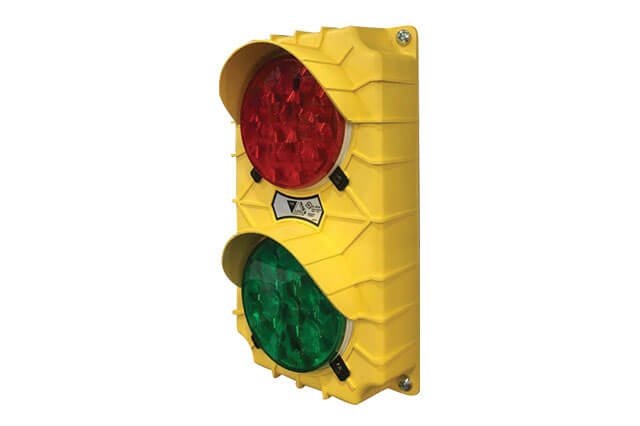
The SG10 is the most straightforward and cost-effective option — a single-unit signal light for applications where a basic stop/go indication is all that’s needed. The polypropylene housing won’t rust, pit, dent, or corrode, and it’s rated for indoor or outdoor use (IP54). Available in safety yellow or black.
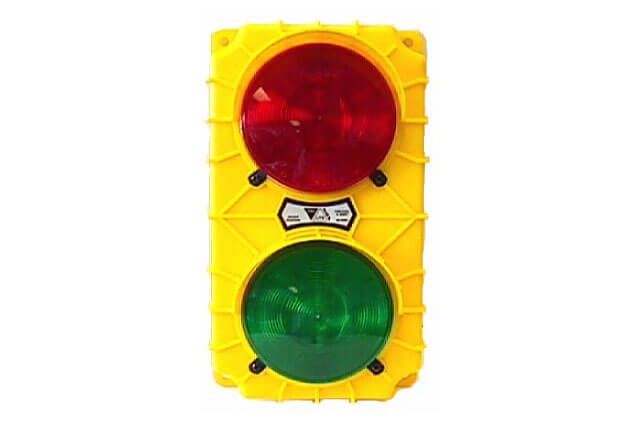
The SG20 steps up the SG10 by including a built-in switch and flasher — everything needed in one unit, no separate electrical components required.
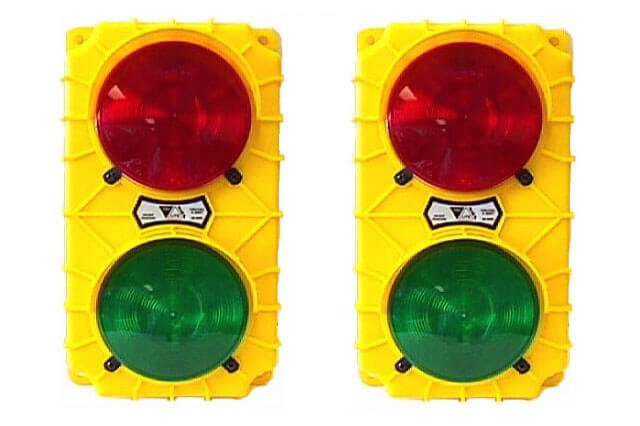
The SG30 set is the complete package and the best visual communication solution for most loading docks. It pairs an SG10 and SG20 together — one inside, one outside — connected by a six-foot cable with a toggle switch. When the truck is secured at the dock, flip the switch: the inside light turns green (safe for forklifts to enter the trailer) and the outside light turns red (truck stays put). Once unloading is done, flip it back: inside goes red, outside goes green, and the driver knows it’s safe to pull away. No radio, no hand signals — just a clear system everyone understands.
Already have Stop and Go lights installed? Tri Lite also offers LED conversion kits to upgrade existing incandescent fixtures to energy-efficient LED — no need to replace the whole system.
Shop Tri Lite Stop and Go Lights at Lighting Specialties
Dock Guide Lights
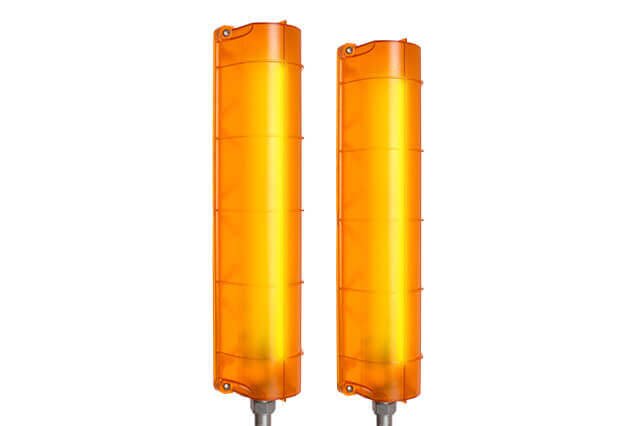
Backing a 53-foot trailer into a dock opening in the dark is harder than it looks. Tri Lite’s Loading Dock Guide Light Set gives drivers a clear visual target — mounted at the edges of the dock opening to help drivers judge alignment as they back in. Using 50 bright LEDs per fixture in a high-impact polycarbonate housing, they’re built to handle the shocks and vibrations of an active dock. Useful in low-light enclosed bays but bright enough to improve visibility in daylight too. Available in 120V AC or 12-24V AC/DC. UL and cUL listed. Made in the USA.
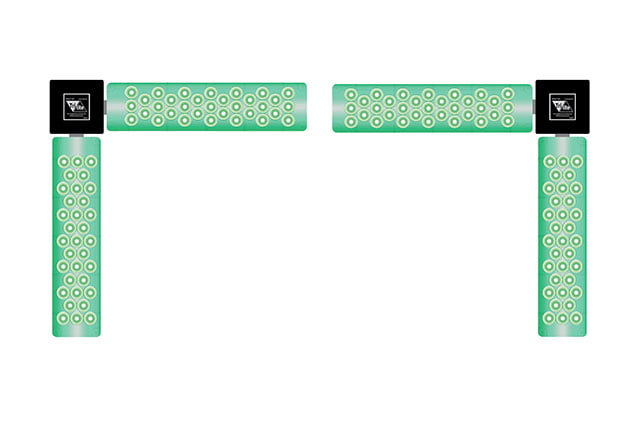
The LED Corner Light Set mounts at the corners of the dock opening to give drivers additional reference points for alignment — especially helpful at night or in facilities with multiple adjacent dock doors where it can be hard to judge spacing.
Shop Tri Lite Dock Guide Lights at Lighting Specialties
Dock Safety Signs
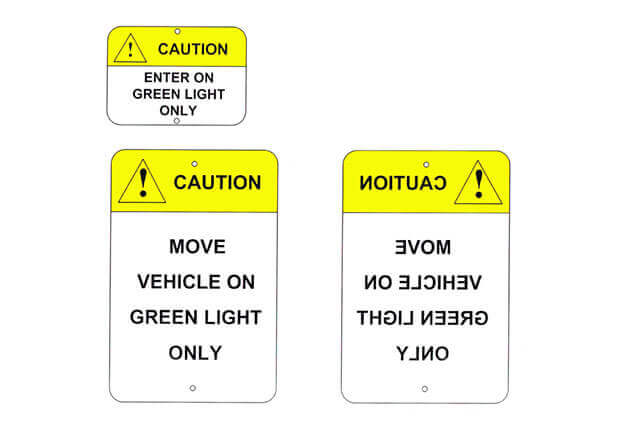
Tri Lite’s Loading Dock Safety Signs reinforce your stop/go signal system with clear, posted instructions for drivers — “Enter on Green,” “Move on Green,” and mirrored versions for driver-side mirror visibility. A small addition that makes a real difference for drivers who are unfamiliar with your facility’s setup.
View Loading Dock Safety Signs at Tri Lite
Ready to Upgrade Your Dock Safety?
Dock accidents are expensive — in downtime, equipment damage, and liability. A complete stop/go and guide light system from Tri-Lite is one of the most cost-effective safety investments a facility can make, and most installations can be up and running in a single day.
Not sure which combination is right for your docks? Call us at 847-215-2000 — we’ll help you spec the right system based on your dock layout, lighting conditions, and traffic volume. Or browse the full Tri-Lite line online and reach out with questions.
We’ve been supplying Tri-Lite products to warehouses and industrial facilities throughout the Midwest for years. We know the product line inside and out and can help you get it right the first time.
Beat the Summer Heat on your Loading Dock!
Comments Off on Beat the Summer Heat on your Loading Dock!
Hot loading dock environments can make demanding work even more challenging. Excessive heat combined with limited airflow can create an uncomfortable workspace that affects employee focus and productivity. When trailer doors open, those conditions can become even more extreme. Temperatures inside a 53-foot trailer can climb drastically higher than the warehouse floor, turning loading and unloading into some of the most physically demanding moments of the shift.
When summer heat settles in, the Tri Lite FANDL Dock Light Fan Kit helps create a cooler, more comfortable loading dock environment. Delivering up to 3,000 CFM of powerful airflow, it helps reduce heat and stagnant air so personnel can stay focused, comfortable, and productive.

Why Warehouse Managers Choose the FANDL
- Heavy-duty 18″ industrial fan delivers up to 3,000 CFM of powerful airflow
- Three-speed operation allows airflow to be adjusted for changing conditions
- Adjustable arm mount directs airflow where it is needed most
- Available in a variety of lengths and light head configurations to fit your setup
- Included “Y” power cord allows fan operation independently or with light heads
- Durable industrial construction helps reduce maintenance requirements
- UL and cUL Listed
- Proudly Made in the USA
A Cooler Dock Is a More Productive Dock
Ready to Cool Down Your Dock?
Summer heat doesn’t let up, and neither does your shipping schedule. If your dock crew is working through hot conditions without adequate airflow, the FANDL is one of the easiest upgrades you can make — it mounts directly to your existing Tri-Lite dock light arm, no new wiring required.
Call us at 847-215-2000 or order the Tri-Lite FANDL online — we’ll make sure you get the right configuration for your setup.